AgLearn is the U.S. Department of Agriculture’s (USDA) Learning Content Management System (LCMS), an online portal that provides valuable training and development opportunities. These free classes are available to USDA employees, partners, contractors, volunteers, conservation planners, and technical service providers. Online courses are offered in topics such as administrative and business skills, leadership, health and wellbeing, mentoring and coaching, as well as job-specific environmental and conservation courses.
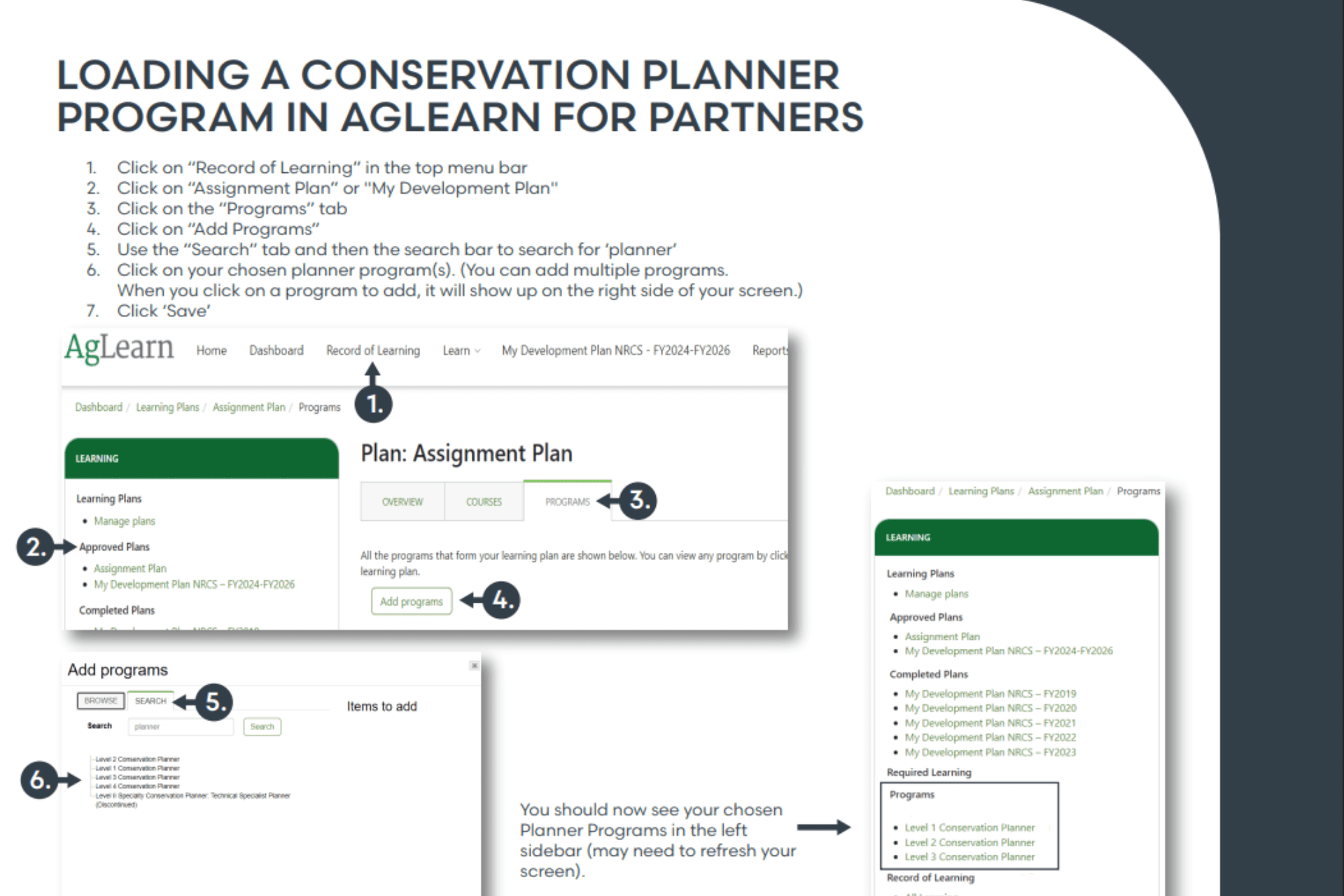
How to Load Programs in AgLearn for Partners
Frequently Asked Questions
How do I access AgLearn?
We recommend contacting your local training officer, AgLearn administrator, or state-level point of contact to access AgLearn. If you need additional assistance, reach out to NCPP at training@wearencpp.com.
How do I create an account?
To use AgLearn, you will need an eAuthentication Account. You can learn how to create one or troubleshoot your existing account at https://www.eauth.usda.gov/eauth/b/usda/faq.
Where can I find help with AgLearn questions?
For all AgLearn-related questions, we recommend contacting your local training officer, AgLearn administrator, or state-level point of contact.
We also recommend taking the AgLearn introductory courses for users. Once you are signed in to AgLearn, you can click on the “Find Learning” tab and type “AgLearn user” into the search block. All 100-level courses are targeted for general users. You will be prompted to enroll yourself in a course.
Additionally, AgLearn offers an interactive user tour. If you do not see the user tour window popping up, you can reset this tour by scrolling to the bottom of your AgLearn dashboard screen and clicking to reset user tour on this page.
For other AgLearn questions, visit the support site at AgLearn Now.